
What to Fix Before Scaling Your Ad Budget
Your ads are bringing in sales, so the next move feels obvious: spend more. But raising the budget does not fix problems. It makes them bigger. A leaky checkout, shaky tracking or thin profit margins can be easy to ignore at a small budget and expensive at a large one.
This guide walks through what to fix before you scale your ad budget, how to check each area, and how to increase spend without panicking when results wobble. It is written for Shopify store owners and online sellers, and the ideas apply to Meta, TikTok and Google campaigns alike.
What Should You Fix First?
Before scaling, make sure your tracking is accurate, your profit survives ad costs, your store converts visitors well, you have fresh creative ready, your campaigns are simple enough to learn from, and your operations can handle more orders. Then raise the budget in controlled steps.
Why Scaling Exposes Weak Spots
At low spend, a small problem hides in the noise. A page that loses a few shoppers or a margin that is slightly too thin barely registers. At higher spend, you pay for every one of those losses at scale. Costs also tend to rise as you spend more, so doubling your budget will not necessarily double your results.
That is why the smartest move is often to strengthen the foundation first. The checklist below covers the seven areas worth reviewing.
The 7 Things to Fix Before You Scale
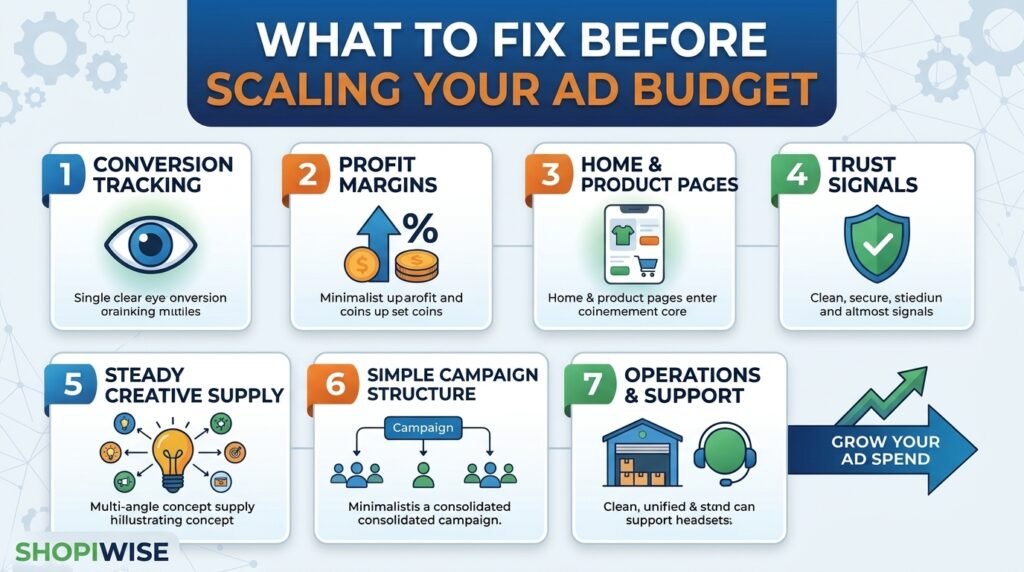
1. Conversion Tracking
Ad platforms use your purchase data to decide who sees your ads. If that data is incomplete, the system is working with a blurry picture. Compare the purchases reported in your ad account with the orders in Shopify. Some guides recommend sending order data from the store backend as well, because browser-based tracking can miss sales. If the numbers are far apart, fix tracking before spending more.
2. Profit, Not Just Revenue
A campaign can look great on return on ad spend and still lose money. Work out your margin after product cost, shipping, payment fees, returns and refunds. Then calculate the cost per purchase you can actually afford. Only scale products where the numbers still work with higher ad costs.
3. Homepage and Product Pages
A shopper should understand what you sell within seconds. On product pages, answer the questions buyers usually have about sizing, materials, delivery and returns. Clear photos and plain language matter more than clever design. If many visitors leave without browsing, new traffic will not help.
4. Trust Signals
Strangers arriving from an ad need reasons to trust you. Show genuine reviews, clear shipping and return policies, visible contact details and secure payment options. Never invent reviews or testimonials. They can mislead customers and break advertising rules.
5. A Steady Supply of Creative
Ads wear out faster when more people see them. Before scaling, have several new angles ready, such as a problem-focused video, a customer-style demo and a benefit-led image. Testing different messages, not only different audiences, gives the platform more to work with.
6. Simple Campaign Structure
Many small campaigns split your data into thin slices. Ad platforms generally learn better when conversions are concentrated in fewer, cleaner campaigns. Consolidate where it makes sense and avoid constant edits that restart learning.
7. Operations and Customer Support
More orders mean more packing, shipping and customer questions. Check that you have enough stock, reliable suppliers, realistic delivery times and a support process that does not collapse under volume. A surge of late deliveries and refunds can cancel out your ad gains.
Quick Pre-Scale Checklist
| Area | What to check | Warning sign |
| Tracking | Ad account purchases vs Shopify orders | Large, unexplained gap |
| Profit | Margin after ad cost, fees and returns | Break-even or negative at current cost per purchase |
| Store | Mobile speed, product pages, checkout | Many visitors, few add-to-carts |
| Trust | Reviews, policies, contact details | No visible policies or proof |
| Creative | New ads ready to test | Only one or two ads running |
| Structure | Number of campaigns and ad sets | Many tiny campaigns with few conversions |
| Operations | Stock, shipping, support capacity | Slow replies or delivery delays already |
A Simple Example
Imagine a store selling kitchen gadgets. One ad earns a good return, so the owner triples the budget. Sales rise at first, then costs climb and refunds increase. A review shows that tracking was counting some orders twice, the product page did not explain size clearly, and returns were eating the margin. After fixing tracking, updating the page and raising prices slightly, the owner scales again in smaller steps and the numbers hold. This is an illustrative scenario, not a real client result.
How to Scale Once You Are Ready
Advice on pacing varies. Older guidance suggested small increases of roughly five to twenty percent to avoid restarting the learning phase. Some experienced advertisers now say Meta handles budget increases more smoothly than it used to. Either way, costs usually rise at higher spend and results can change, so a measured approach is sensible.
- Scale proven ads first. Increase spend on campaigns that already perform well, not on weak ones.
- Raise the budget in steps. Make a moderate increase, then wait for results to settle before the next one.
- Watch the right numbers. Track cost per purchase, conversion volume and your real profit, not only return on ad spend, which can lag behind.
- Keep launching new creative. Add fresh ads while you scale, so you are not depending on one winner.
- Set a rollback rule. Decide in advance when you will lower the budget, for example if cost per purchase stays above your limit for several days.
Common Mistakes to Avoid
- Doubling or tripling the budget overnight because one day looked great.
- Judging success by revenue and ignoring margin, refunds and shipping costs.
- Scaling before tracking has been checked against real orders.
- Constantly duplicating campaigns or tweaking audiences instead of fixing the store.
- Running out of stock or support capacity just as sales rise.
- Relying on a single ad creative with nothing in reserve.
Frequently Asked Questions
When is it safe to scale my ad budget?
When your tracking is reliable, your profit holds after ad costs, your store converts consistently and you can fulfill more orders. No moment is risk-free, but these checks reduce avoidable losses.
How much should I increase my ad budget at once?
There is no single right number. Smaller, steady increases are the cautious choice, and you should wait for results to stabilize before the next step. Test what works for your own account.
Why did my results drop when I scaled?
Costs commonly rise as spend grows, and the platform may need time to adjust. Also check tracking, creative fatigue and your store for problems that only appear at higher volume.
Should I fix my website or my ads first?
Check the website and tracking first. If visitors do not buy, more ad spend only pays for more of the same result.
Do I need a lot of ads before scaling?
You need enough variety that one tired ad does not sink the campaign. A handful of distinct angles is a practical starting point.
Conclusion
Scaling is not about spending more. It is about making sure every extra dollar meets a store that tracks properly, converts well and earns a profit. Fix the foundation, scale in controlled steps, and keep watching the numbers. No approach guarantees results, but a prepared store gives you the best chance.
If you want help with the work behind the ads, the team at Shopiwise supports online sellers with digital marketing and ad campaigns and Shopify store setup and optimization. Get in touch to see how we can help you get ready to scale.