
How to Retarget Shopify Visitors (and Win Back Lost Sales)
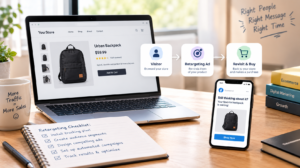
Most people who visit your Shopify store leave without buying. They browse, add something to the cart, get distracted, and never come back. That is normal, and it is exactly why retargeting exists.
Retargeting means showing ads or messages to people who have already interacted with your store. Done well, it brings interested shoppers back at a lower cost than reaching strangers. This guide explains how to retarget Shopify visitors step by step, from tracking setup to audiences, creative and measurement.
How Do You Retarget Shopify Visitors?
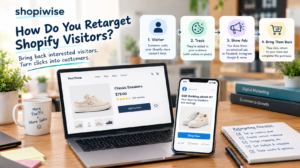
Install and verify your tracking, split visitors into behavior-based audiences, exclude people who already bought, show each group a message that matches what they did, limit how often they see your ads, and measure whether the campaign pays off. Pair paid ads with email for the best coverage.
Step 1: Set Up Tracking and Respect Privacy
Retargeting only works if your store records what visitors do. If you advertise on Facebook and Instagram, Shopify lets you manage this through the Facebook & Instagram sales channel. In your Shopify admin, open the channel, go to Settings, then Data sharing settings, and connect your Meta pixel.
Shopify describes three data sharing levels. Standard relies on the browser-based pixel, which ad blockers can stop. Enhanced adds the Conversions API, which sends purchase data from the server, and shares customer details to help match shoppers on Facebook. Maximum includes everything in Enhanced plus Meta’s newest advertising features. The pixel can record page views, product views, searches, add-to-cart actions, checkout starts and purchases.
Data sharing is optional, and you are responsible for explaining it in your privacy policy. Rules such as GDPR and CCPA may also require visitor consent, depending on where your customers live. This is general information and not legal advice, so check the rules for your markets.
Step 2: Build Audiences Based on Behavior
A visitor who abandoned a cart is far warmer than someone who glanced at your homepage. Treating them the same wastes money. Start with a few clear groups and expand later.
| Audience | Who they are | Message that fits |
| Cart abandoners | Added to cart but did not buy | Show the exact product, answer doubts, offer free shipping or a small incentive |
| Product viewers | Looked at items but did not add to cart | Reviews, benefits, bundles or answers to common questions |
| General visitors | Browsed the homepage or collections | Broader, problem-focused content such as customer videos or best sellers |
| Past customers | Already bought | Related products, restock reminders or loyalty offers |
Step 3: Exclude People Who Already Bought
Ad platforms charge for impressions, so showing a product ad to someone who just bought it burns budget and can annoy a happy customer. Exclude recent purchasers from campaigns promoting the same product. Then use a separate campaign to show buyers complementary products or restock reminders.
Step 4: Match the Ad to the Shopper’s Stage
Dynamic product ads show people the items they viewed, which suits cart abandoners and product viewers well. For cold browsers, lead with a benefit or a customer story instead of pushing a hard sale. Small incentives like free shipping can help convert warm shoppers, but use them sparingly so you do not train customers to wait for discounts.
Step 5: Set Time Windows and Limit Frequency
Timing matters. Shorter windows suit cart recovery because intent fades quickly. Longer windows work for restock reminders and follow-up offers. One source suggests sequencing messages across roughly a month, starting helpful, adding urgency early, then scaling back spend as the chance of a sale drops. Treat that as a starting point and adjust to your own buying cycle.
Also cap how often people see the same ad and refresh your creative every so often. Seeing one ad too many times leads to fatigue and annoyance.
Step 6: Add Email Alongside Paid Ads
Email does not depend on ad pixels, and it reaches people directly. An abandoned cart email sequence can run beside your ads. If your traffic is small, email may be the better place to start. One guide suggests paid retargeting needs about a thousand or more visitors a month to be meaningful. That is a rough rule of thumb from one source, not a fixed threshold.
Step 7: Extend to Google and Other Channels
Once the Facebook and Instagram basics work, consider remarketing on Google and other platforms. Follow the same principles: segment by behavior, exclude buyers, use relevant messages and watch frequency. Set up Google audiences inside Google Ads and check their current requirements before launching.
Step 8: Measure and Test
Review click-through rate, cost per click and spend regularly, but judge the campaign by cost per purchase and profit. Compare what it costs to win a customer with what that customer is worth over time. Test one change at a time, such as the offer, the creative or the time window, so you know what made the difference.
A Simple Example
Imagine a store selling handmade candles. The owner connects the Meta pixel and creates three audiences: cart abandoners from the last seven days, product viewers from the last fourteen days, and recent buyers. Cart abandoners see a dynamic ad with the candle they left behind and a free shipping message. Product viewers see customer reviews. Buyers are excluded from both and later see a refill reminder. The owner caps frequency, swaps creative every couple of weeks and watches cost per purchase. This is an illustrative scenario, not a real client result.
Common Mistakes to Avoid
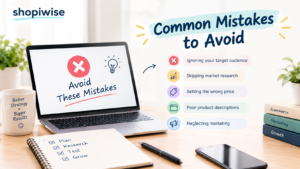
- Installing the pixel and treating retargeting as finished, with no audience segments or sequence.
- Using one generic ad for every type of visitor.
- Forgetting to exclude people who already purchased.
- Showing the same ad too often or for too long.
- Ignoring consent rules and privacy policy updates.
- Relying only on pixel data when tracking limits can hide some visitors, instead of also building an email list.
Frequently Asked Questions
What is retargeting in Shopify?
It is the practice of showing ads or messages to people who previously visited your store, viewed products or started checkout, to bring them back to complete a purchase.
Do I need the Meta pixel to retarget Shopify visitors?
For Facebook and Instagram retargeting, yes. Connecting a pixel through the Facebook & Instagram sales channel is the usual route. Email retargeting works without it.
How long should I retarget visitors?
It depends on your product and buying cycle. Cart abandoners usually call for short windows, while restock reminders may need longer ones. Test and adjust.
Is retargeting worth it for a small store?
It can be, but with little traffic the audiences may be too small for ads to work well. Starting with email and growing traffic first is a sensible option.
Is retargeting allowed under privacy laws?
Rules vary by region and may require consent and clear disclosure in your privacy policy. Check the requirements for the countries you sell to, and seek legal advice if unsure.
Conclusion
Retargeting turns near-misses into second chances. Set up reliable tracking, build audiences around what visitors actually did, exclude buyers, match your message to intent and keep an eye on frequency and profit. Results are never guaranteed, but a structured approach beats generic ads every time.
If you want help setting this up, the team at Shopiwise supports online sellers with digital marketing and ad campaigns and Shopify store setup and optimization. Contact us to talk about bringing more of your visitors back.