
5 Shopify Store Mistakes That Are Killing Your Sales (and How to Fix Them)
You spent weeks choosing a theme, uploading products and setting up ads. Visitors are arriving, yet orders are not. If that sounds familiar, the problem is rarely a lack of effort. More often, a handful of fixable Shopify store mistakes are quietly pushing shoppers away before they buy.
In this guide, we walk through five of the most common issues in online stores, explain why each one costs you sales, and share practical ways to fix them. There are no hacks and no guarantees, just clear steps you can start on today.
Prefer a quick overview first? Watch the short video above, then come back for the full breakdown.
Mistake 1: A Slow, Bloated Store
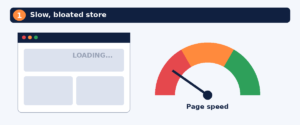
Shoppers decide quickly. If your pages take too long to appear, many will leave before they see a single product. Google’s Core Web Vitals offer a useful benchmark: a Largest Contentful Paint, which is the time it takes for the biggest element on the screen to load, of 2.5 seconds or less is considered good.
On Shopify, slowness usually comes from the same few sources:
- Oversized, uncompressed product and banner images
- Too many installed apps, each adding scripts that load on every page
- Heavy themes packed with sliders, animations and auto-playing video
- Leftover code from apps you uninstalled long ago
How to fix it
- Run your homepage, a collection page and a product page through Google PageSpeed Insights, and note the mobile results.
- Compress images before uploading and keep hero images only as large as they need to be.
- Review your app list. Remove anything you do not actively use, then check your theme for leftover code.
- Simplify the homepage. One clear message and a few featured collections often beat ten busy sections.
- Re-test after each change so you know what actually helped.
Tip: Test on a real phone using mobile data, not only on fast office Wi-Fi. Check your analytics to see how many of your own visitors shop on mobile.
Mistake 2: Weak Product Pages
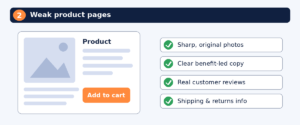
Your product page is where the buying decision happens. Thin descriptions, dark or inconsistent photos and missing answers force shoppers to guess, and most will simply move on to a competitor.
Common problems include descriptions copied from the supplier, a single low-quality image, no size or material details, no reviews, and shipping or return information buried where nobody looks.
What a strong product page includes
- Several clear images from different angles, plus photos that show the product in use. Original images build more trust than generic supplier shots.
- A benefit-first description that explains what the product does for the customer, followed by specifications.
- Visible price, variant options and stock status.
- Customer reviews and photos where you have them.
- Short shipping, returns and guarantee details close to the Add to Cart button.
For example, instead of “Stainless steel bottle, 750 ml,” explain who it is for and why it matters: “A leak-proof 750 ml bottle that fits most cup holders, so your water goes wherever you do.” Only claim features your product genuinely has.
If product visuals are holding your store back, a professional graphic design service can help you create consistent, on-brand images and banners.
Mistake 3: A Confusing Checkout and Surprise Costs
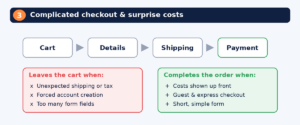
Even when a shopper is ready to buy, the checkout can lose them. Baymard Institute, which has researched ecommerce usability for years, reports an average documented cart abandonment rate of roughly 70 percent across dozens of studies. Not all of that is avoidable, because many people are only browsing. Baymard also found that the average large ecommerce site could gain around 35 percent in conversion rate through better checkout design.
Typical checkout mistakes include:
- Revealing shipping costs, taxes or fees only at the final step
- Forcing customers to create an account before paying
- Asking for more information than you really need
- Offering too few payment options
- Giving no clear delivery time estimate
How to fix it
- Show shipping costs or free-shipping thresholds early, on the product page or in the cart.
- Allow guest checkout, and enable express payment options your customers already use, such as Shop Pay, Apple Pay or Google Pay where they are available in your region.
- Keep forms as short as possible.
- Place trust signals near payment, such as secure payment messaging and a clear returns policy.
- Place a real test order on mobile every month and note anywhere you hesitate.
Keep in mind that Shopify controls much of the checkout layout, so focus on what you can change: shipping rates, payment methods, policies and the information shown before checkout begins.
Mistake 4: Ignoring SEO and Store Structure
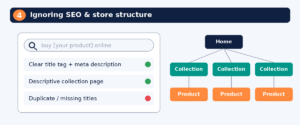
Paid ads can bring traffic, but if every visit has to be bought, growth stays expensive. Many Shopify stores skip the basics of search optimization, so people searching for what they sell never find them.
Watch for these common issues: default or duplicated page titles and meta descriptions, collection pages with no description, vague product names, image files named like IMG_2043.jpg with no alt text, and navigation menus that are confusing or too deep.
How to fix it
- Give every key page a unique SEO title and meta description in the Shopify admin.
- Add short, helpful introduction text to collection pages, since they often match what shoppers search for.
- Use descriptive image file names and alt text.
- Organize your menu so shoppers can reach any product in about three clicks.
- Publish helpful content that answers buyer questions and links to the relevant products.
SEO takes time and results vary, so treat it as a long-term investment rather than a quick fix. If you want expert support, our digital marketing services cover SEO, social media and ad campaigns.
Mistake 5: No Follow-Up and No Data
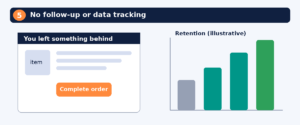
A first visit rarely turns into a sale, and a first sale is only the beginning. Stores that never follow up leave revenue on the table, and stores that never look at their data keep repeating the same mistakes.
Warning signs include abandoned checkout emails switched off, no welcome or post-purchase message, no review requests, and nobody checking analytics beyond total sales.
How to fix it
- Turn on abandoned checkout recovery emails. Shopify offers this feature, though the options available depend on your plan.
- Set up a simple welcome email for new subscribers and a thank-you message after purchase.
- Ask for a review a few days after delivery.
- Track a few key numbers each month: conversion rate, add-to-cart rate, checkout completion rate, mobile versus desktop performance and your top exit pages.
- Change one thing at a time so you can see what works.
Quick Store Audit: Where to Start
Not sure which problem is hurting you most? Use this table for a fast first check. If you can only fix one thing this week, start with speed or checkout, because they sit closest to the moment of purchase.
| Mistake | 5-minute check | First fix |
| Slow store | Test mobile speed in PageSpeed Insights | Compress images and remove unused apps |
| Weak product pages | Open your best seller as a stranger would | Add clear photos and benefit-first copy |
| Confusing checkout | Place a test order on your phone | Show costs early and allow guest checkout |
| Ignoring SEO | Search your product name plus “buy” | Write unique titles and meta descriptions |
| No follow-up or data | Check if abandoned checkout emails are on | Enable recovery emails and review monthly metrics |
Frequently Asked Questions
Why is my Shopify store getting traffic but no sales?
This is usually a conversion problem rather than a traffic problem. Check your page speed, product pages and checkout first, and make sure the visitors you attract actually match what you sell.
How fast should a Shopify store load?
Google rates a Largest Contentful Paint of 2.5 seconds or less as good, measured for at least 75 percent of page views. Use Google PageSpeed Insights to see where your store stands.
How can I reduce cart abandonment on Shopify?
Show all costs early, allow guest and express checkout, keep forms short and send abandoned checkout reminders. Some abandonment is normal, so aim to reduce it rather than remove it.
Do I need SEO if I run paid ads?
Yes, in most cases. Paid traffic stops when your budget does, while good SEO can keep bringing relevant visitors over time. It does take patience, and results are never guaranteed.
How often should I audit my store?
A quick review every quarter works well, plus a check any time you change your theme, add major apps or launch a new collection.
Conclusion
Fixing these five Shopify store mistakes will not happen overnight, but every improvement makes your store faster to use, easier to trust and simpler to buy from. Start with one, measure the result, then move on to the next.
If you would rather hand the work to specialists, Shopiwise offers Shopify store setup, optimization, SEO and sales growth support. Explore our Shopify services, read how Shopify store development can improve the online shopping experience, or contact our team to talk about your store. You can also visit Shopiwise.com to see everything we offer.