
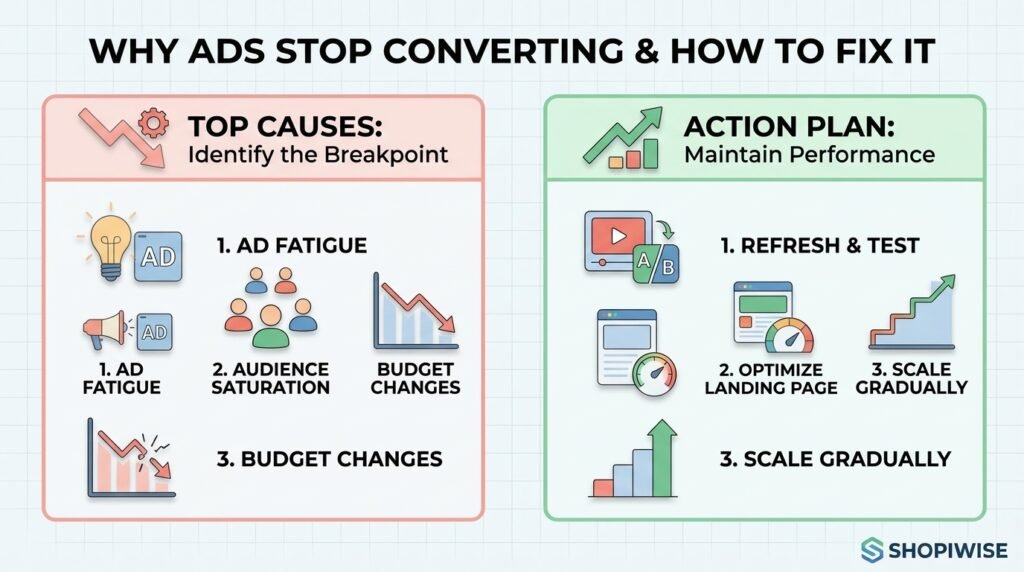
Why Your Winning Ad Suddenly Stops Converting
Why Your Winning Ad Suddenly Stops Converting (and How to Fix It) You finally find an ad that works. Sales come in at a healthy cost, so you raise the budget. Then, a week or two later, conversions fall off a cliff. Nothing obvious has changed in the campaign, yet the results look completely different. If you run ads for a Shopify store or any online shop, this is one of the most frustrating patterns in paid advertising. The good news is that a winning ad rarely stops working for a mysterious reason. In most cases it fades because of one of a handful of causes you can identify and test, and you can often recover performance without starting from zero. This guide explains why ads stop converting, how to tell which cause you are dealing with, and a practical plan to fix it and keep your results steadier over time. Why Do Winning Ads Stop Converting? Most winning ads stop converting because of creative fatigue, audience saturation, changes made while scaling, problems on the landing page or store, or shifts in the wider market. Often it is a mix of two or three. The key is to diagnose first, because the fix for each cause is different. The 5 Most Common Reasons a Winning Ad Stops Working 1. Creative Fatigue When the same people see the same ad again and again, they stop noticing it. Click-through rate slips, cost per result climbs, and a once-profitable ad drifts toward break-even. Marketing publications describe winning ads as something that usually decays gradually rather than failing overnight, and Shopify merchants on the Shopify Community forum describe ads that bring sales for the first few days and then fade. Creative fatigue is the most commonly blamed cause, but it is not the only one, so do not assume it before checking. 2. Audience Saturation and Overlap Sometimes the creative is fine and the audience is the problem. If your audience is small, or your retargeting and prospecting audiences overlap, the same people may see your ad far more often than you realize. One marketer writing about creative fatigue described an ad that looked burned out but recovered once audience overlap and spend pacing were corrected. It is a single account, not a rule, but it shows why a quick check of overlap and frequency is worth your time. 3. Changes Made While Scaling Scaling is where many winners die. Raising the budget sharply, changing countries, or editing the ad itself can all disrupt how the platform delivers it. Several Shopify merchants in community threads describe ads that worked at low spend but produced no sales once they were scaled. A learning period after big edits can also look exactly like fatigue, so check your change history before blaming the creative. 4. Landing Page or Store Problems Your ad may still be doing its job while the page behind it is not. Clicks stay steady but purchases drop. Common culprits include a slow mobile page, a product that went out of stock, a price or shipping change, a broken checkout step, an app conflict, or tracking that stopped recording purchases correctly. If the ad is still earning clicks, the store is the first place to look. 5. Market and Competition Shifts Ad costs are not fixed. Seasonality, new competitors, and busy shopping periods can push costs up even when your ad has not changed. If costs rise across all your campaigns at once, the cause is probably the auction rather than one tired creative. How to Diagnose the Real Cause Before you change anything, match what you see in your ad account to the most likely cause. Frequency alone is not proof of fatigue, so always look at more than one signal. What you see Likely cause First thing to check CTR falling and frequency rising on one ad Creative fatigue Daily CTR trend; test a fresh version of the creative Every ad in the ad set declining, with a small audience Audience saturation Audience size, overlap with other ad sets, frequency Drop right after a budget or targeting change Scaling or learning disruption Change history; compare performance before and after Clicks steady but purchases down Landing page, store or tracking Add-to-cart and checkout rates, page speed, stock, tracking Costs up across all campaigns Auction or market shift Other campaigns, seasonality, competitor activity Step-by-Step: How to Fix an Ad That Stopped Converting Pause before you edit. Review several days of data instead of reacting to one bad day. Changing five things at once makes it impossible to learn what worked. Find where the funnel breaks. Look at impressions, click-through rate, add-to-cart, checkout and purchases. The stage where numbers drop tells you whether the problem is the ad or the store. Test your own store. Place a test order on mobile, check page speed, confirm products are in stock, and make sure your purchase tracking still works. Review recent changes. List every budget, audience, creative or website change from the past two weeks and compare them with the date performance dropped. Refresh the creative, not just the copy. Try a new opening hook, a new angle (problem, benefit, social proof), or a new format such as a short demo, user-generated style video, or carousel. Keep the core offer that was working. Duplicate instead of editing the winner. Clone the ad and test one variable at a time so the original stays intact as a benchmark. Rework the audience. Broaden a tiny audience, exclude recent purchasers, and reduce overlap between ad sets so the same people are not being reached repeatedly. Scale in smaller steps. Increase budgets gradually and give each change time to settle before making the next one. Set your decision rules in advance. Decide how many days and how much spend you need before calling an ad dead, so you do not kill good ads too early. A Simple Example Imagine a store selling pet accessories. A video ad performs well for